User guide: Water-cooled Pneumatic ATC
Contributed by a user
This guide was written by an ncSender user for their own machine. It is shared as a worked example. Check every value against your own spindle, VFD and controller manuals before you use it.
A complete set-up of a water-cooled pneumatic ATC spindle run by ncSender through the ncWirelessIO →: wiring, air lines, cooling loop, VFD settings and the Pneumatic ATC → plugin settings.
Download the guide (PDF, 9 pages) →
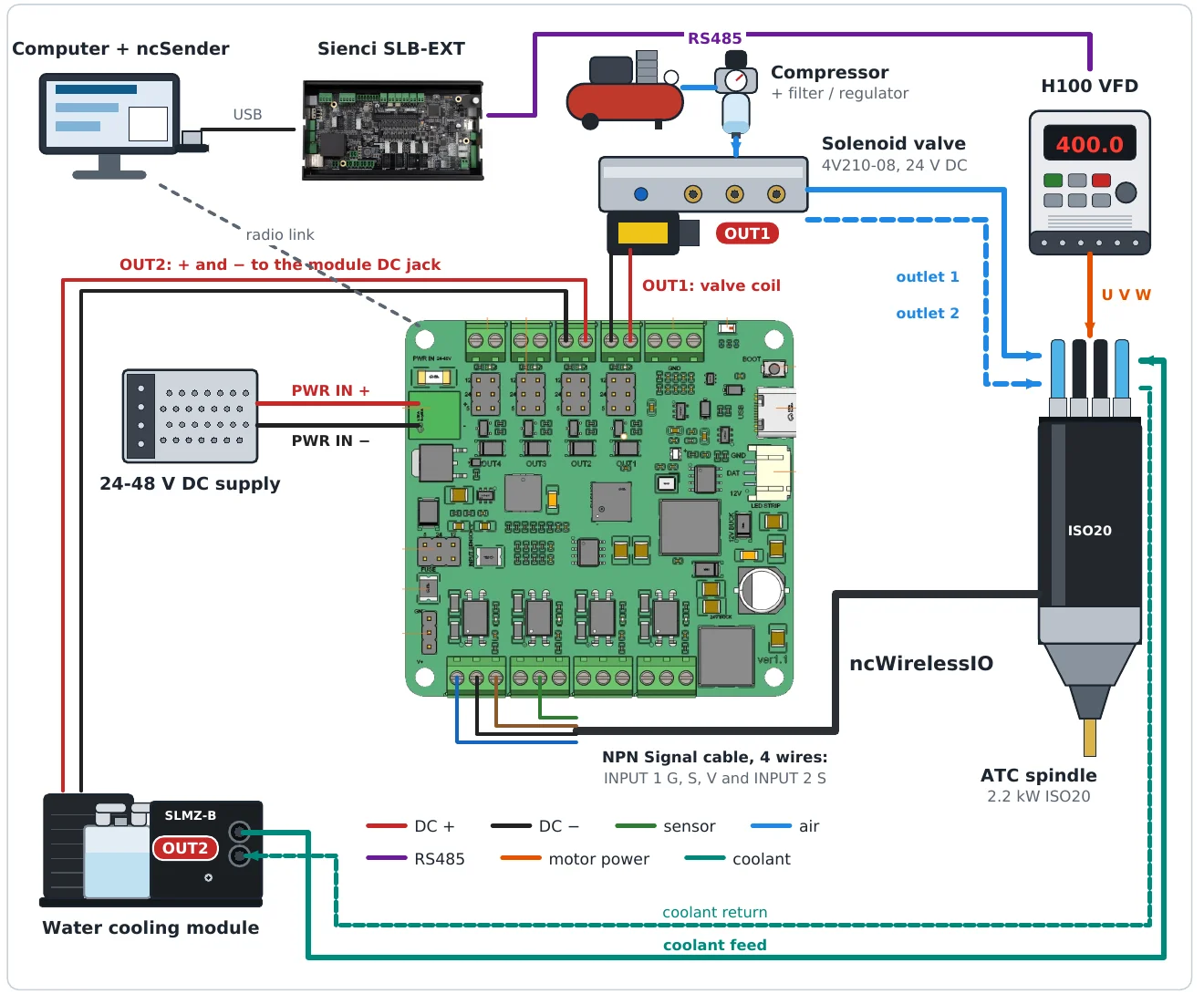
The set-up
| Part | Used here |
|---|---|
| Spindle | G-Penny 2.2 kW ISO20 water-cooled ATC spindle, 220 V, 24,000 rpm (2-pole 400 Hz or 4-pole 800 Hz) |
| VFD | H100, over RS485 (Modbus) |
| Controller | Sienci SLB-EXT (grblHAL) |
| Wireless I/O | ncWirelessIO: OUT1 solenoid valve, OUT2 cooling module, INPUT 1 and INPUT 2 spindle sensors |
| Valve | 4V210-08 solenoid valve, 24 V DC coil |
| Cooling | SLMZ-B water cooling module, powered straight from OUT2 |
What's in the guide
- How to set up the ATC spindle: the whole system and the parts list.
- Cooling loop: hoses, quick-disconnects, filling, and powering the module from OUT2.
- Air lines: compressor to valve, and which valve outlet goes to Tool Change, De-dusting and Air Seal.
- Spindle top plate and plugs: every port, and the power and sensor plug pin-outs.
- Wiring the ncWirelessIO: jumpers first, then power, OUT1, OUT2 and the NPN sensor plug.
- Wiring the H100 VFD to the SLB-EXT: mains (USA and Europe), motor plug, RS485.
- H100 VFD settings for both spindle options.
- SLB-EXT settings and speed check.
- ncSender settings: pairing the ncWirelessIO and setting up the Pneumatic ATC plugin.
For the ncWirelessIO itself (jumpers, outputs, inputs, roles), see ncWirelessIO →.