grblHAL Setup
grblHAL is a high-performance CNC controller firmware that ncSender fully supports.
Connection
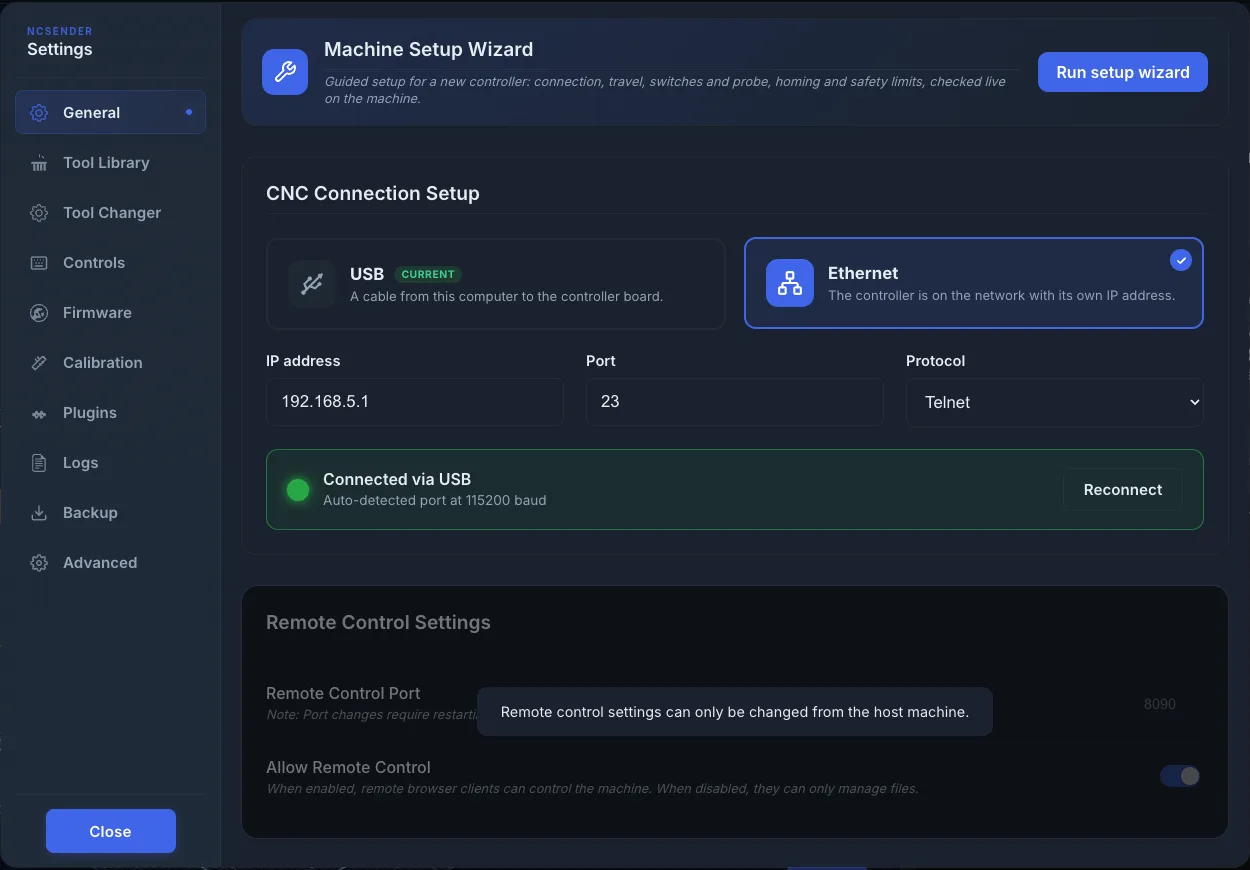
Set up the connection in Settings → General → CNC Connection Setup.
- USB: pick a Serial port, or leave it on Auto-detect. Pick a Baud rate from 115200, 230400, 250000, 460800 or 921600. grblHAL boards use 115200.
- Ethernet: enter the board's IP address, then pick a Protocol: Telnet (port 23) or WebSocket (port 81). Only for boards with networking.
grblHAL boards typically use DTR for USB communication. ncSender handles this automatically.
For a new controller, run the Machine Setup Wizard. You can start it again any time from Settings → General → Run setup wizard.
Firmware Settings
Change grblHAL settings in Settings → Firmware. You can search, see what each setting does with its unit and range, and import or export all settings. Settings that need a controller restart show a Requires Restart badge. See Firmware Settings.
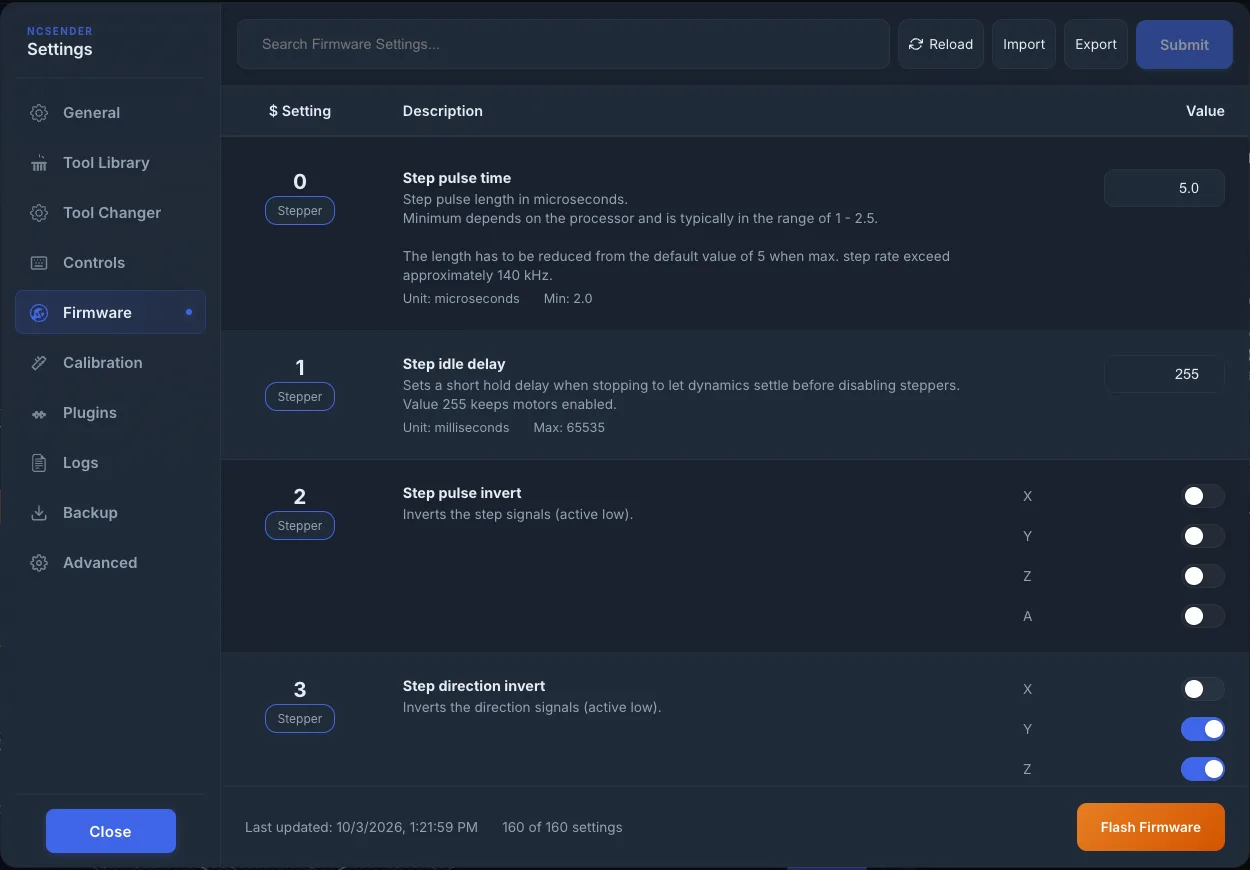
The same tab has Flash Firmware for loading new firmware onto the board.
From the console
You can also type settings in the console:
$$lists all settings.$<number>=<value>sets one value, for example$110=5000.$helpshows the available commands.
Key Settings
| Setting | Description | Example |
|---|---|---|
$22 |
Homing enable | 1 (enabled) |
$30 |
Maximum spindle speed (RPM). Set it to your spindle's real maximum: it scales every S value and sets the top of the spindle card presets. The default of 1000 is almost never right. | 24000 |
$31 |
Minimum spindle speed (RPM). Set it to your spindle's real minimum: lower S values run at this speed, and it is the lowest spindle card preset. | 0 or 6000 |
$32 |
Laser mode | 1 (laser), 0 (normal) |
$100-$102 |
Steps per mm (X/Y/Z). Tune with Calibration (Pro). | 80 steps/mm |
$110-$112 |
Max feed rate (X/Y/Z) | 5000 mm/min |
$120-$122 |
Acceleration (X/Y/Z) | 500 mm/sec^2 |
$130-$132 |
Max travel (X/Y/Z). Tune with Calibration (Pro). Also used by the Keepout Zone (Pro). | 1200 mm |
Status Reporting
ncSender asks grblHAL for its status at a set interval. Change it in Settings → General → Status Polling Interval: Fast (50ms), Normal (100ms) (default) or Relaxed (150ms). The status report includes:
- Machine and work positions
- Machine state (Idle, Run, Hold, Alarm, etc.)
- Feed rate and spindle speed
- Pin states (probe, limits, door)
- Overrides (feed, rapid, spindle)
- Work Coordinate Offset (WCO)
Alarms
grblHAL alarm codes are fetched and shown with descriptions. The alarm dialog in the visualizer names each alarm in plain English, says how to clear it, and keeps retrying Press to Unlock for 30 seconds. You can also send $X from the console. See Alarms for the full list.
A wrong switch inversion ($5, $6) or motor fault input ($744, $745) trips an alarm the moment it is applied. The Machine Setup Wizard checks these live and lets you flip the inversion back and unlock from the same page.
Probing
grblHAL supports:
G38.2— Probe toward target, error if no contactG38.3— Probe toward target, no errorG38.4— Probe away from target, error if no contact breakG38.5— Probe away from target, no error
Realtime Commands
ncSender uses grblHAL's realtime commands for instant response:
| Byte | Command |
|---|---|
! |
Feed hold |
~ |
Cycle start / Resume |
? |
Status query |
0x18 |
Soft reset |
0x85 |
Jog cancel |
0x87 |
Full status report |
0xA0 |
Toggle flood coolant |
0xA1 |
Toggle mist coolant |
These bypass the planner buffer and execute immediately.