Alarms
When the controller stops for safety, it goes into alarm. ncSender tells you what happened and how to fix it.
The Alarm Dialog
When an alarm happens, a dialog appears over the visualizer. It shows:
- A plain name for the alarm, such as Hard limit hit.
- What to do to fix it.
- The controller's own code and message, with an Alarm N badge.
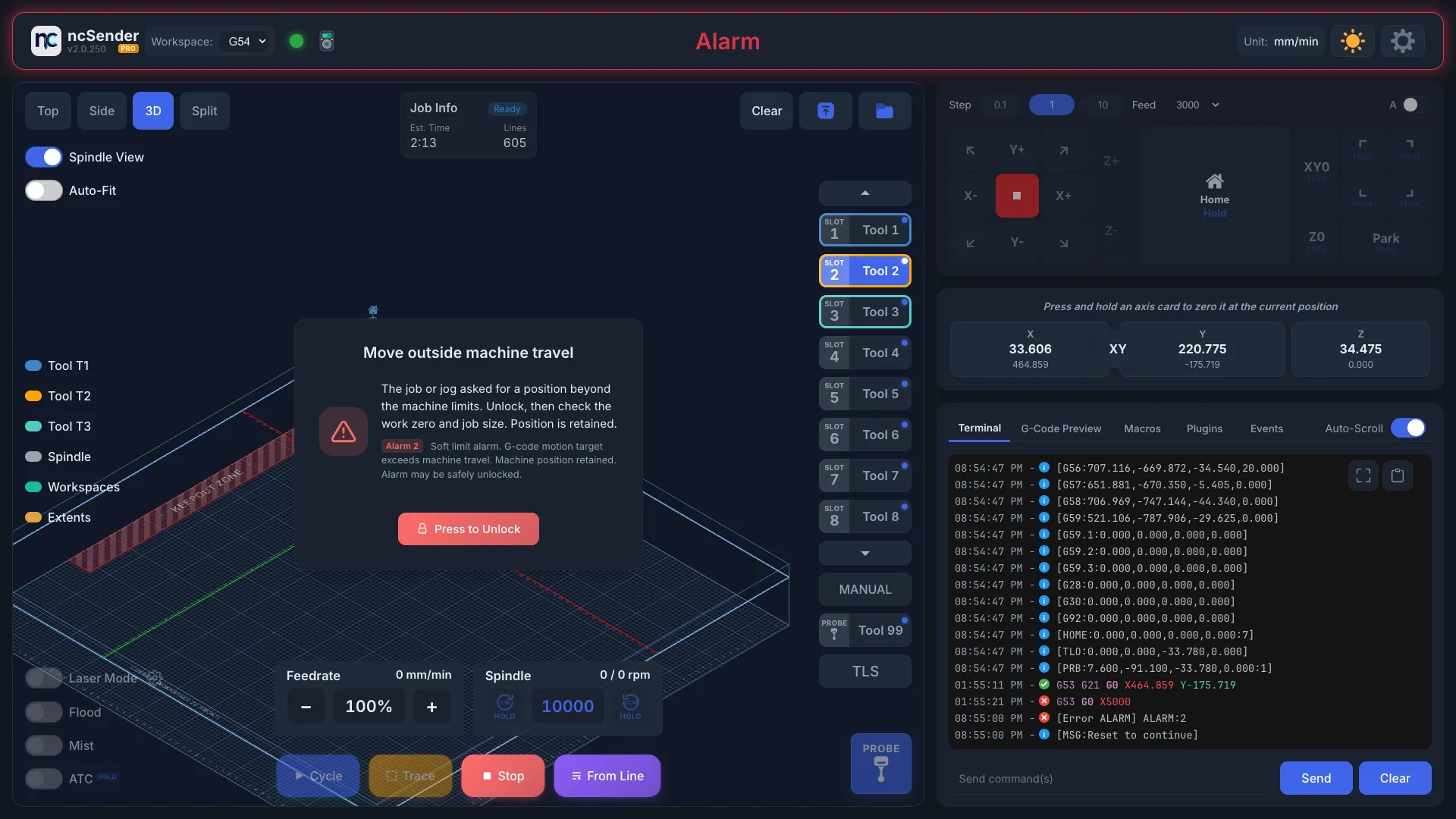
The dialog closes by itself once the alarm clears. The pendant shows the alarm too, with its own Unlock.
Unlocking
- Read the fix and do it first, for example release the E-stop or jog off a switch.
- Click Press to Unlock.
- ncSender keeps trying for up to 30 seconds and counts down ("Unlocking… 25s").
If the cause is still there, the dialog says the controller refuses to unlock. Fix the cause (release the E-stop, clear the switch, or fix the motor fault input) and it unlocks on the next try.
You can also type $X in the console.
Re-home after an alarm
If an alarm says position may be lost, home the machine before you jog or run a job. The Home button shows when the machine needs homing.
Alarm List
| Alarm | Name | What to do |
|---|---|---|
| 1 | Hard limit hit | A limit switch was hit while moving. Unlock, then re-home. Position may be lost. |
| 2 | Move outside machine travel | A job or jog asked for a position past the machine limits. Unlock, then check your work zero and job size. |
| 3 | Reset while moving | The machine was reset or E-stopped while moving. Unlock, then re-home. |
| 4 | Probe already triggered | The probe was touching before probing started. Lift the tool off the probe or check for a shorted probe wire, then unlock and retry. |
| 5 | Probe did not make contact | Nothing was touched within the probing distance. Check the probe is connected and under the tool, then unlock and retry. |
| 6 | Homing was interrupted | Homing was reset before it finished. Unlock, then home again. |
| 7 | Door opened during homing | Close the safety door, unlock, then home again. |
| 8 | Homing pull-off failed | An axis couldn't back off its switch. Check the switch and wiring or increase the pull-off distance ($27), then re-home. |
| 9 | Limit switch not found | An axis moved its full search distance without hitting a switch. Check the switch and wiring or the max travel ($130–$132), then re-home. |
| 10 | Emergency stop pressed | Release the E-stop, then press Unlock. Re-home if the machine was moving. |
| 11 | Homing required | The machine doesn't know where it is. Unlock, then press Home. |
| 12 | Limit switch engaged | An axis is sitting on a limit switch. Unlock, jog away from the switch, then continue. |
| 13 | Probe protection triggered | The probe touched something while not probing. Move the tool clear of the probe, then unlock. |
| 14 | Spindle did not reach speed | The spindle didn't reach the set RPM in time. Check the VFD and spindle, then unlock and retry. See VFD Setup. |
| 15 | Second limit switch not found | The auto-squared axis couldn't find its second switch. Check both switches and wiring, then re-home. |
| 16 | Controller self-test failed | Power-cycle the controller. If it repeats, check the board and drivers. |
| 17 | Motor fault | A motor driver reported a fault. Right after an E-stop, drivers can flag a fault while their power comes back: wait a few seconds, then unlock. If this started right after turning on motor fault inputs, the input reads backwards. See below. Otherwise check motor wiring and driver temperature, power-cycle, then re-home. |
| 18 | Homing not configured correctly | Homing settings are invalid. Check the homing settings ($22, $23, $44–$47) before homing again. |
| 19 | Modbus communication error | The controller lost contact with the VFD. Check the RS485 cable and VFD power, then unlock. |
| 20 | I/O expander not responding | Check the I/O expander's wiring and power-cycle the controller. |
| 21 | Controller storage failure | The controller couldn't read or write its settings memory. Power-cycle it. If it repeats, the board may need service. |
Safety door open is not a numbered alarm. Close the door, then press Unlock. See Safety Door.
Power-On E-Stop Check
Right after power-on, some controllers go into alarm with no code. ncSender shows Power-on safety check. This confirms your E-stop works.
- Press the E-stop button in.
- Release it.
- Click Press to Unlock.
Alarms That Point to a Setting
Some alarms are caused by a setting, not a fault. Change these in Firmware Settings or with the Machine Setup Wizard:
| Alarm | Setting to check |
|---|---|
| 8 Homing pull-off failed | Pull-off distance $27 |
| 9 Limit switch not found | Max travel $130–$132 |
| 17 Motor fault | Motor fault input inversion $745. The setup wizard lets you flip it and unlock on the same page. |
| 18 Homing not configured correctly | Homing settings $22, $23, $44–$47 |
Toolpath Outside the Machine
Before you run, the visualizer shows Toolpath exceeds machine boundaries if the program would go past the machine's travel. This isn't an alarm yet, but running it would cause alarm 2. Check your work zero and program size. See Out-of-Bounds Detection.