Jog Controls
Use the jog controls to move the machine by hand: to position your workpiece, set zeros, or check clearances.
Jog Panel Layout
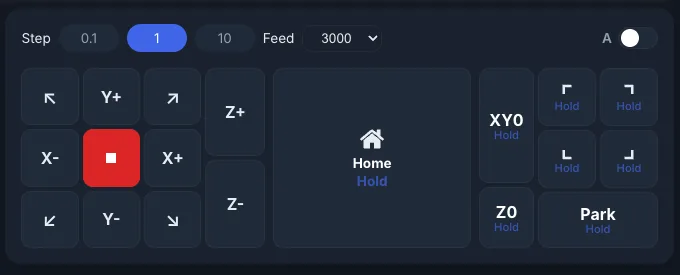
The jog panel has:
- XY buttons: move X and Y, including the four diagonals.
- Stop button (red, in the middle): stops all motion right away. It is always available.
- Z+ / Z-: move up and down.
- A toggle: switches the Z buttons to A+ / A- for a rotary axis (only when your controller has an A axis).
- Step and Feed: how far and how fast each jog moves.
- Home: see Homing.
- XY0 / Z0, corner buttons and Park: see Go To Zero & Park.
Step Sizes
There are three step buttons: small, medium and large. Tap a button to use it. Press and hold it (half a second) to open a list of every value in its range. Each button remembers the last value you picked.
| Button | Values in the list |
|---|---|
| 0.1 | 0.01, 0.05, 0.1, 0.2 … 0.9 |
| 1 | 1, 2, 3 … 9 |
| 10 | 10, 20 … 100, 150, 200, 250, 300 |
| Button | Values in the list |
|---|---|
| 0.01 | 0.001, 0.005, 0.01, 1/64, 0.02, 1/32, 0.03 … 0.06, 1/16, 0.07 … 0.09 |
| 0.1 | 0.1, 1/8, 0.2, 1/4, 0.3, 0.4, 1/2, 0.6, 5/8, 0.7, 3/4, 0.8, 0.9 |
| 1 | 1, 2, 3 … 10 |
Feed Rates
Each step button has its own feed rate and its own Feed list. Pick a rate from the list next to the step buttons. The defaults are:
| Step button | Metric | Imperial |
|---|---|---|
| Small | 500 mm/min | 20 in/min |
| Medium | 3000 mm/min | 100 in/min |
| Large | 6000 mm/min | 200 in/min |
The rate is for X and Y. Z jogs at half of it, and the A axis at a quarter.
Jog Modes
Step Jog
Tap a direction button to move one step.
Continuous Jog
Hold a direction button to keep moving. The machine stops as soon as you let go.
Diagonal Jog
The four corner arrows (↖ ↗ ↙ ↘) move X and Y together.
Keyboard and Gamepad
The default keys are:
| Key | Action |
|---|---|
| Left / Right | Jog X- / X+ |
| Up / Down | Jog Y+ / Y- |
| Page Up / Page Down | Jog Z+ / Z- |
To change keys or set up a gamepad, go to Settings → Controls. There you can also set keys to switch between step sizes and to home the machine.
Keyboard jogging is off when your controller requires homing at startup and the machine is not homed yet.
Quick Zero
Double-click an axis card in the DRO to type a coordinate. Press and hold an axis card to zero it where the machine is. See DRO.
Homing
Homing uses press-and-hold so it can't start by accident:
- Hold Home for about 1 second to home all axes. A bar fills while you hold.
- Double-tap Home to split it into HX, HY and HZ. Hold one to home just that axis.
Not-homed indicator
When homing is set up on your controller and the machine has not been homed yet, the Home button pulses. It stops once homing finishes. If your machine has no homing, the button never pulses.
Pro: if a keepout zone is on, ncSender asks you to confirm before homing X and Y.
Go To Zero & Park
These buttons move the machine to a spot. They don't set one. Hold a button to move; a bar fills while you hold.
- XY0: hold to go to work X0 Y0. Z rises to a safe height first. Double-tap to split it into X0 and Y0, each moving one axis.
- Z0: hold to move Z to its work zero.
Setting zero vs. going to zero
These buttons go to a zero you already set. To set a work zero, press and hold the axis card in the DRO.
Corner Buttons
Hold Top-Left, Top-Right, Bottom-Left or Bottom-Right to move to that corner of the machine's travel.
Park
Hold Park for about 1 second to go to your saved parking spot. Z rises to a safe height first.
To save a parking spot:
- Jog to the spot you want.
- Double-tap Park. The button changes to Save.
- Tap Save. It shows Saved, then goes back to Park.
If you don't tap Save within 6 seconds, the button goes back to Park without saving.
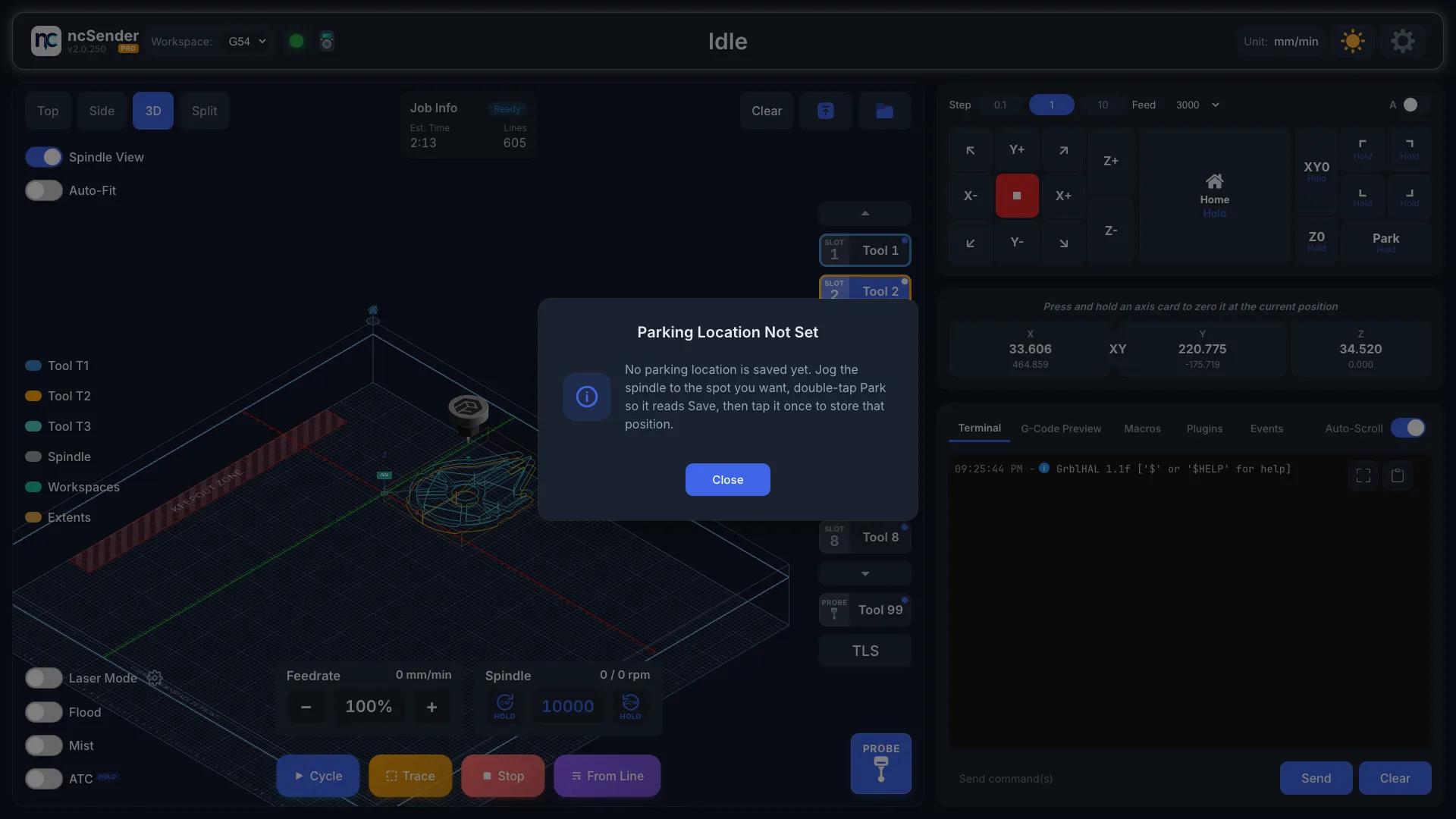
If no spot is saved yet, holding Park shows Parking Location Not Set with these same steps.
Homing Requirement
- XY0, X0 / Y0 and Z0 always work when your machine has no homing. When homing is set up but the machine is not homed, holding one shows the Machine is not homed prompt first. Choose Continue to move anyway or Abort to stop.
- Park and the corner buttons need homing. They stay off until the machine is homed, and they never work on a machine without homing.
Pro: jogs stop at the edge of the keepout zone.